
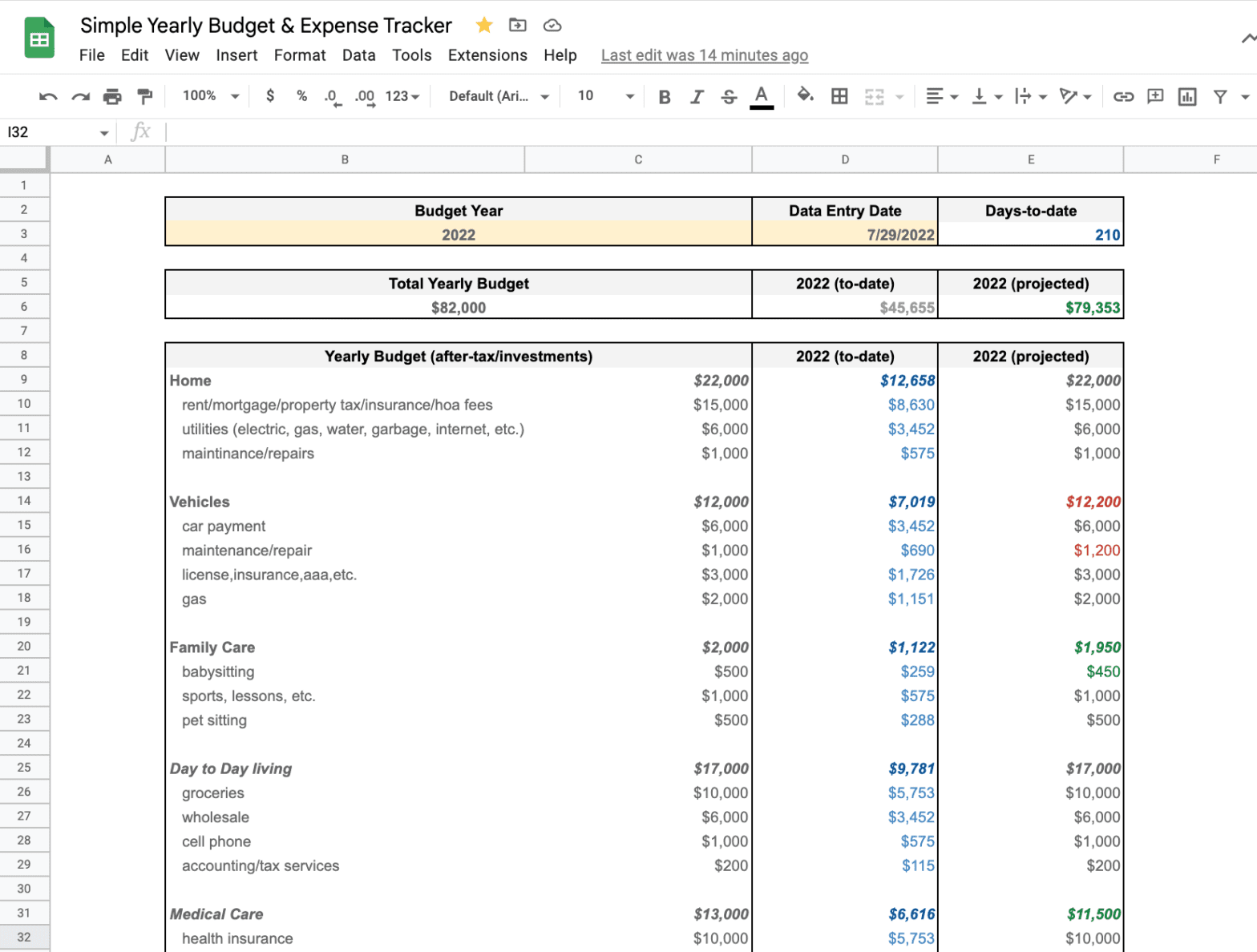
While Mrs. AR and I don’t typically keep a firm budget, every so often I like to keep tabs on our expenses and see where there is room for improvement.
This tool provides an easy way to do that, as well as a useful way to forecast expenses for the year as well.
We use Empower to tie all the data together, and from there, I enter it all down into this spreadsheet.
My spreadsheet works with both Google Sheets and Microsoft Excel. It is a simple and easy-to-use template.
How to Use The Expense Tracker Template
First up, go ahead and download the Simple Yearly Budget & Expense Tracker Template
- For both Google Sheets and Microsoft Excel users, click here to “make a copy” of the Simple Yearly Budget & Expense Tracker
- For Excel users only, you will then want to click “File” then –> “Download” –> “Microsoft Excel (.xlsx)”
Ok, now that you’ve got the file, you need to go ahead and start to fill it out.
- Enter the Budget Year, and the Data Entry Date

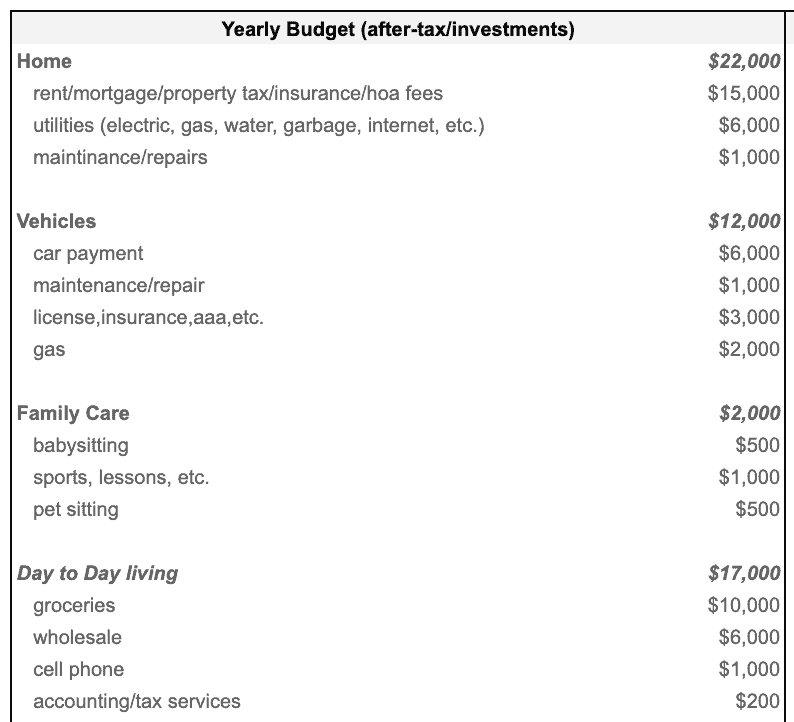
- Fill out your Yearly Budget (Column C)
- If you don’t currently have a budget, it will be useful to enter in last year’s expense information as a starting point.
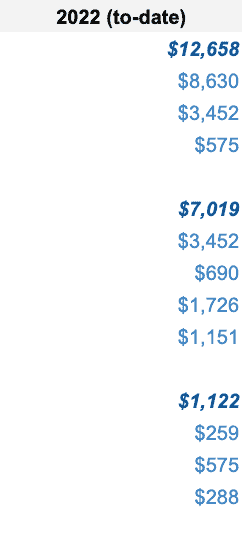
- Next Up, Fill out the Year-to-Date Expense Data (Column D)
- Log in to Empower (or your CC)
- Pull up a report for Year-to-Date Expenses
- Search and log each expense category or major expense
- Projected Expenses (Column E) will auto-populate as you do so
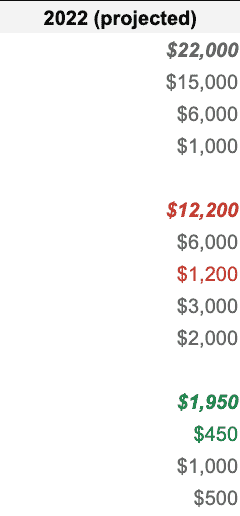
And that’s that. You’ll be able to see any expenses that are projected to be over budget in red, and anything under budget in green:

As you can see by my made up numbers, we are under-budget. Whoop!
Staying on-budget is harder than ever these days.
I know that I’ve gone over budget myself this year, and to stay on track, my wife and I look over which areas we might be able to cut back on, subscriptions we may want to cancel, or service providers that might make sense switching.
My recommendation: indulge in the things you love, and cut out the rest!
I hope this helps you, and please let me know if you have any questions at all!
Frequently Asked Questions
Is the Expense Tracker Template free?
Yep, completely free. Just click the link to make a copy in Google Sheets, and it’s yours. No sign-up, no catch.
Does it work with both Google Sheets and Excel?
It does. I personally use it in Google Sheets, but if you’re an Excel person, just make a copy first in Google Sheets and then download it as a .xlsx file. Same experience either way.
Do I need to already have a budget set up to use this?
Not at all…and honestly, Mrs. AR and I don’t keep a firm budget ourselves. If you’re starting from scratch, just pull last year’s expenses and use those as your starting point in the Yearly Budget column. That’s exactly what I’d do.
I don’t use Empower. Can I still use this template?
Absolutely. Empower is just what I use to pull everything together in one place, but you can use any tool — your bank’s website, your credit card portal, Mint, YNAB, a spreadsheet you already keep. As long as you can get to your year-to-date expenses by category, you’re set.
How does the Projected Expenses column work?
You don’t have to do anything — it auto-populates as you fill in your year-to-date actuals. The template does the math and projects out your full-year spending based on where you are in the year. It’s one of my favorite parts of the sheet.
What does over or under budget look like?
Color-coded, which makes it dead simple. Any expense category that’s projected to go over budget shows up in red, and anything under budget shows in green. One glance and you know exactly where to focus.
How often should I update it?
I’d say monthly at most, but even quarterly is useful. The main thing is that you’re catching overruns before they compound — not doing a year-end autopsy and wondering where your money went. Ten minutes once a month is all it really takes.
What should I do if I’m over budget in a category?
Honestly, my approach is pretty simple: indulge in the things you actually love, and cut the stuff you barely notice. Subscriptions are usually the first place I look — there’s almost always something in there I forgot I was even paying for. Then, service providers like insurance or phone plans, where you can often get a better rate just by asking.
Hey! Can you recommend any iphone app with the similar functionality? Thank you.
I personally use and recommend Personal Capital. It makes it easy to sort through my budget and view expenses by category. Can’t go wrong with using it and my manual budget tracker!